[HOW TO FLASH] how to flash Megasat Force 1 +
To flash the Megasat Force 1+, you will follow a similar procedure to the Force 2, but with a specific distinction in the folder structure and the hardware confirmation. This model is a powerful twin-tuner Broadcom receiver that remains popular for its reliability.
1. Preparation
-
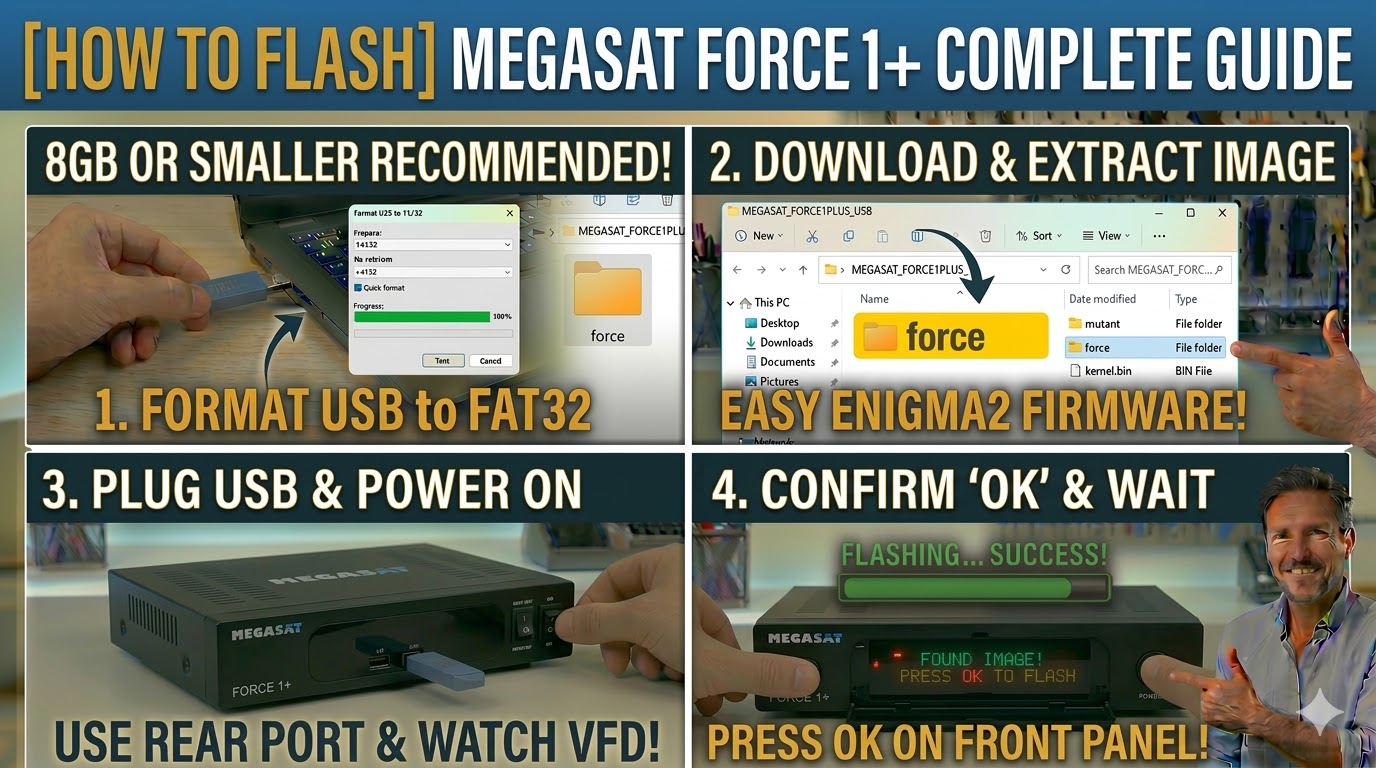
USB Stick: A high-quality USB 2.0 or 3.0 stick. As with most Enigma2 boxes of this era, 8GB or smaller is the “sweet spot” for compatibility.
-
Format: The stick must be formatted to FAT32.
-
Firmware: Download the image specifically for the Megasat Force 1 Plus (OpenATV, OpenHDF, or OpenPLi).
2. Folder Structure
The bootloader identifies the firmware through a specific directory path.
-
Extract the downloaded firmware
.zipfile on your computer. -
You will see a folder named
force. -
Copy the entire
forcefolder to the root of your USB stick.-
Path:
USB:\force\ -
Contents: Inside the
forcefolder, you should see files likekernel.bin,rootfs.bin, andimageversion.
-
3. The Flashing Process
-
Power Off: Turn off the receiver using the power switch at the back.
-
Insert USB: Plug the USB stick into the rear USB port.
-
Power On: Turn the back power switch to ON.
-
Initiate Flash:
-
Watch the front panel VFD display.
-
When it detects the USB, it will display a message: “Found Image! Press OK to flash”.
-
Quickly press the OK button located on the front panel (behind the flap) to confirm.
-
-
Wait: The display will show the progress (e.g., “Flashing…”). Do not turn off the power during this process.
-
Completion: The receiver will reboot automatically. You can then safely remove the USB stick and begin the Setup Wizard.

The flashing process should take approximately two to four minutes to complete, while the receiver
is being flashed it is vitally important that you DO NOT power the receiver down for any reason as
this can cause serious and or permanent damage.