[HOW TO FLASH] how to flash NOVALER Multibox 4K SE
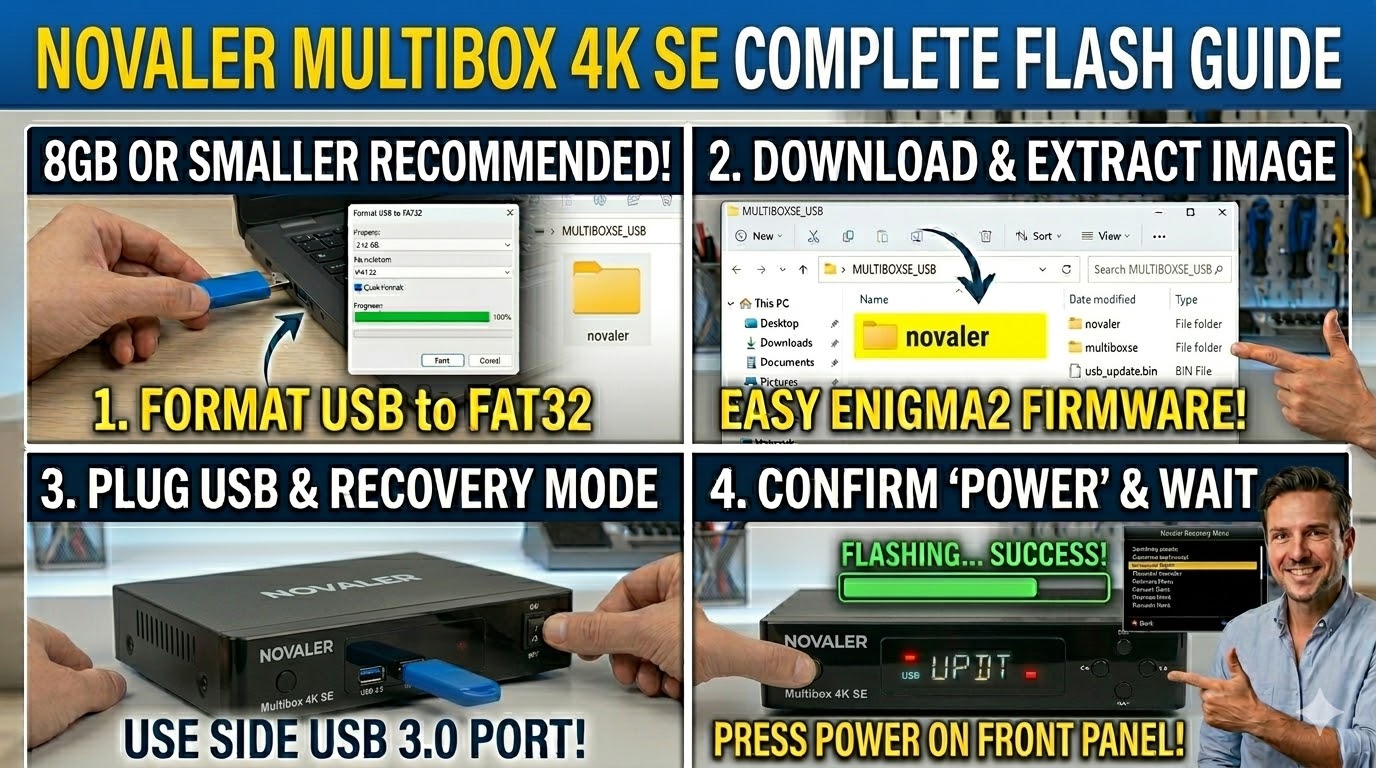
To flash the Novaler Multibox 4K SE, you’ll use the USB recovery method common to Hisilicon-based 4K receivers. This model is highly popular for its multiboot capabilities, allowing you to run Enigma2, Android, and other systems simultaneously.
1. Preparation
-
USB Stick: Use a high-quality 8GB or smaller USB drive.
-
Format: Must be FAT32.
-
Firmware: Download the image specifically for the Multibox 4K SE.
-
Look for the
_recovery.emmc.zip(for a full reset/recovery). -
Or the
_mmc.zip(for updating a specific multiboot slot).
-
2. Folder Structure
The Novaler bootloader looks for a specific directory name on the USB root.
-
Extract the firmware zip on your computer.
-
You will see a folder named
novaler. -
Copy that
novalerfolder to the root of your USB stick.-
Path:
USB:\novaler\multiboxse\ -
Contents: Inside, you should see files like
usb_update.bin,boot.img, androotfs.tar.bz2.
-
3. The Flashing Process (Recovery Menu)
-
Power Off: Turn off the receiver using the power switch at the back.
-
Insert USB: Plug the stick into the USB 3.0 port (usually the blue one on the side).
-
Enter Recovery:
-
Press and hold the Power button on the front panel.
-
While holding it, flip the back power switch to ON.
-
Keep holding the front button until the “BOOT” message appears on the display or the Novaler Recovery Menu appears on your TV.
-
-
Select Flash: Use the remote to navigate the menu:
-
“Flash Recovery Image”: Use this for a complete system overhaul.
-
“USB Multiboot Image Upgrade”: Use this to install a new image into one of the empty slots.
-
-
Confirm: Select the file from the USB and press OK. The display will show “UPDT” or a progress bar. The box will reboot automatically when finished.
Pro-Tip for enigma2.net
The Novaler Multibox 4K SE is unique because it often comes with a specialized “Novaler TV” skin and specific Android integration. When documenting this for your site, remind users that the folder name novaler is critical; the box will ignore folders named octagon or multibox even if the hardware is similar.