[HOW TO FLASH] how to flash uClan Ustym 4K OTT Premium
The uClan Ustym 4K OTT Premium is a specialized Hisilicon-based receiver designed for high-end IPTV and Enigma2 performance. Like its “Pro” sibling, it uses a recovery-based system that allows you to manage different software slots.
Preparation
-
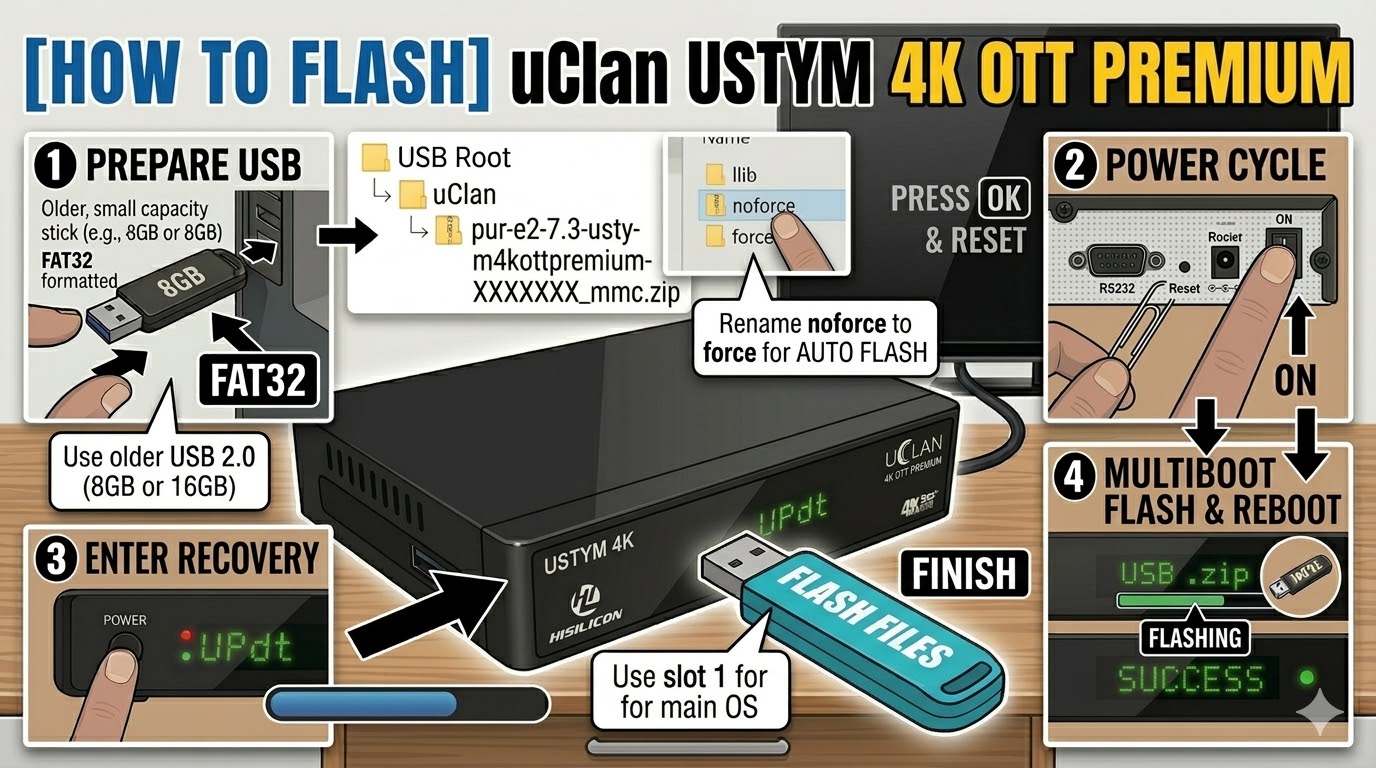
USB Drive: Use a FAT32 formatted USB stick. A USB 2.0 (8GB or 16GB) drive is recommended for maximum bootloader compatibility.
-
The Files: Download the “mmc” or “recovery” version of your chosen image (e.g., OpenATV, PurE2).
-
Path: Place the image zip file directly on the root of your USB drive. Do not unzip it unless you are performing a low-level “recovery” flash.
-
Path:
USB Root > openatv-7.x-ustym4kottpremium-XXXXXXXX_mmc.zip
-
Flashing Steps (The Recovery Method)
-
Power Off: Turn off the receiver using the physical power switch at the back.
-
The Reset Trigger: * Locate the small Reset button on the rear of the device.
-
Using a paperclip or pin, press and hold the Reset button.
-
-
Power On: While holding the Reset button, flip the back power switch to ON.
-
Enter Recovery: Keep holding the button until you see the Recovery Menu on your TV screen (or “Updt” on the front display).
-
Install Image:
-
Use the remote to select “USB Multiboot Image Upgrade.”
-
Navigate to your USB drive and select the
.zipfile. -
Choose the Slot (e.g., Slot 1) where you want to install the new software.
-
-
Finish: Once the process hits 100%, select “Reboot” and choose the slot you just updated.
Alternative “Emergency” Flash
If the box won’t boot at all:
-
Extract the recovery zip to the USB root. You should see a folder named
uclanand a file namedusb_update.bin. -
Insert USB, hold the Power Button on the front panel (or the Reset button), and power on the box.
-
The box will automatically detect the files and begin a forced recovery.
Troubleshooting Tips
-
USB Recognition: If the Recovery Menu doesn’t see your zip file, try the other USB port (there is usually one on the side and one on the back).
-
Network Flashing: If the box is connected via Ethernet, you can often select “Network Upgrade” from the Recovery Menu to download and flash the latest images without using a USB stick at all.

The flashing process should take approximately two to four minutes to complete, while the receiver
is being flashed it is vitally important that you DO NOT power the receiver down for any reason as
this can cause serious and or permanent damage.