[HOW TO FLASH] how to flash worldvision force 1
The Worldvision Force 1 is a classic Enigma2 receiver that requires a specific folder structure to initiate the flashing process. It is very similar to the “Plus” model but uses its own dedicated folder name.
Preparation
-
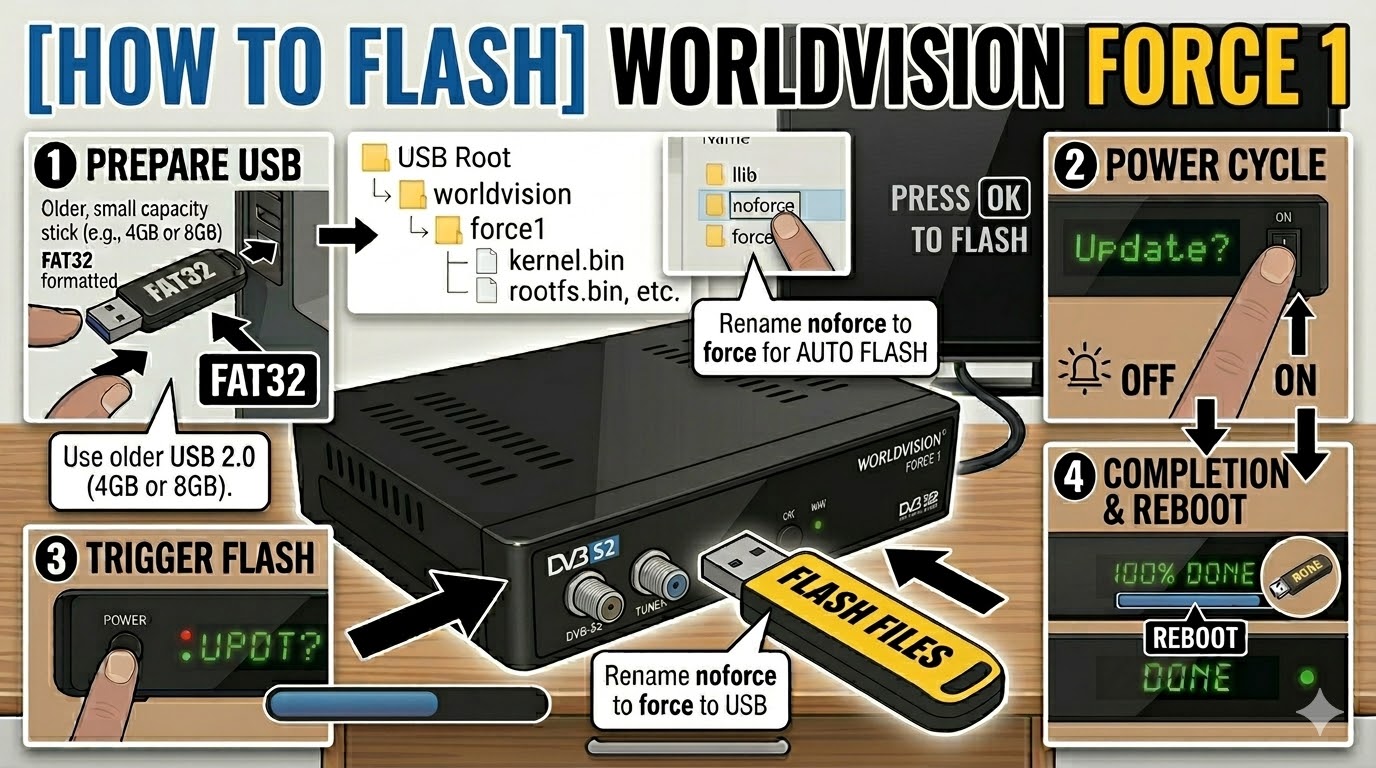
USB Drive: Use a FAT32 formatted USB stick. It’s highly recommended to use an older USB 2.0 drive (8GB or less) as these receivers can be picky about newer USB 3.0/3.1 hardware.
-
The Files: Extract your image zip file (e.g., OpenATV, OpenViX). You must see a folder named
worldvisionand a subfolder inside it namedforce1. -
Root Path: Copy the
worldvisionfolder to the root of the USB drive.-
Structure:
USB Drive -> worldvision -> force1 -> (files: kernel.bin, rootfs.bin, etc.)
-
Flashing Steps
-
Power Down: Turn off the receiver using the physical power switch at the back.
-
Insert USB: Plug the USB stick into the front USB port (located behind the front flap).
-
Power On: Flip the rear power switch to ON.
-
The Trigger: * Watch the front panel display (VFD).
-
When it shows “Update?” or “Confirm?”, immediately press the Power Button on the front panel (behind the flap).
-
-
Flashing Process: The display will change to “Flashing” or show progress. This process takes about 3 to 5 minutes. Do not turn off the device during this time.
-
Completion: Once the process is finished, the display will show “Success” or “Done”, and the box will reboot automatically.
-
Finalize: Unplug the USB stick as soon as the box starts to reboot.
Troubleshooting
-
Box ignores the USB: If the receiver boots directly into the old image, double-check that the folder is named exactly
force1(no spaces). You might also try using the rear USB port. -
The “Force” Shortcut: To make the box flash automatically without a button press, open the
force1folder on your PC, find the file namednoforce, and rename it toforce. Re-insert the USB and power on.