[HOW TO FLASH] how to flash Octagon XP1000 +
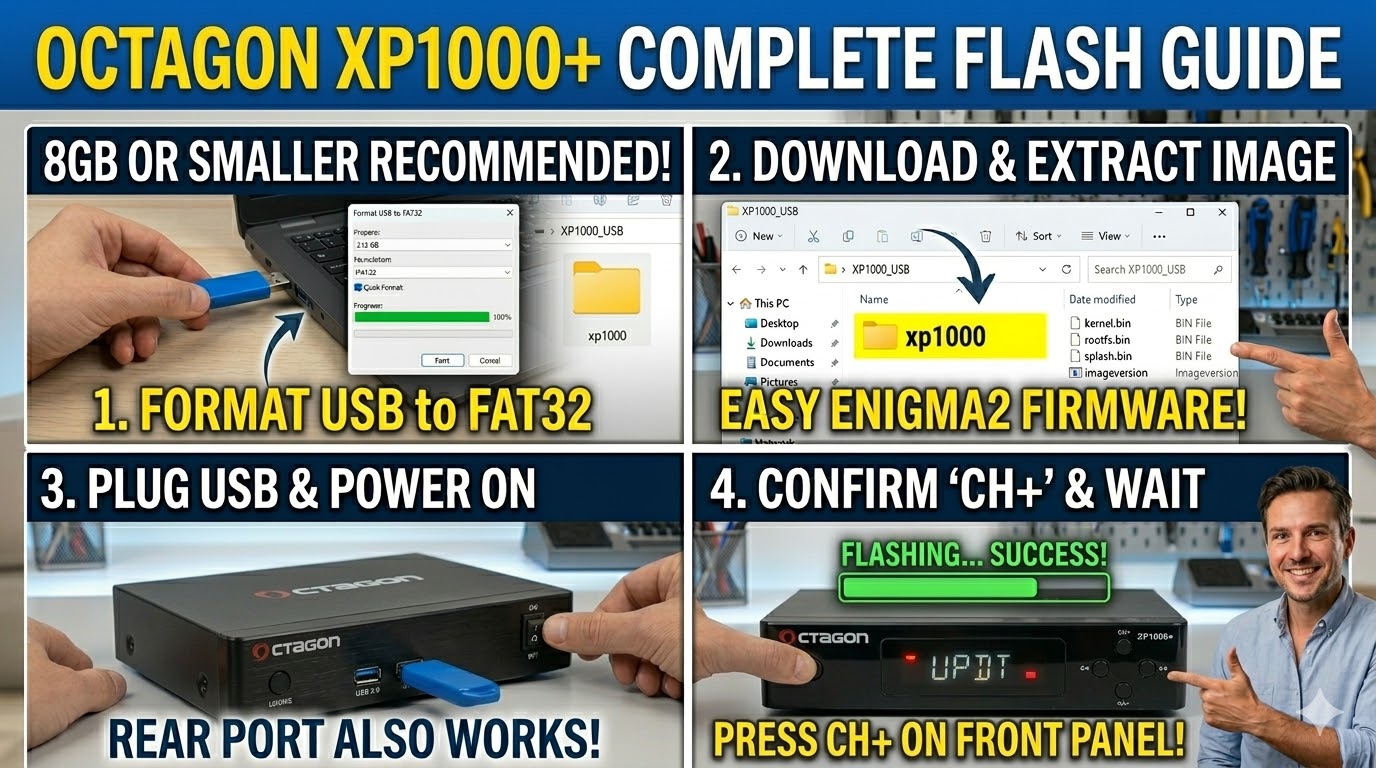
To flash the Octagon XP1000+, you will follow the standard Enigma2 USB method. The most important detail for this specific model is the folder name and the button-press sequence.
1. Preparation
-
USB Drive: Use a USB stick (max 8GB is safest).
-
Format: Format it to FAT32.
-
Firmware: Download your preferred image (OpenATV, OpenPLi, etc.).
2. Folder Structure
The Octagon XP1000+ requires a specific path to trigger the bootloader:
-
Extract the firmware
.zipfile. -
You will find a folder named
xp1000. -
Copy the entire
xp1000folder to the root of your USB stick.-
Path:
USB:\xp1000\ -
Contents: Inside, you should see files like
kernel.bin,rootfs.bin, andimageversion.
-
3. The Flashing Process
-
Power Off: Turn off the receiver using the power switch at the back.
-
Insert USB: Plug the USB stick into the rear or front USB port.
-
Power On: Turn the back switch to ON.
-
Confirm Flash: * Watch the front panel. When the LED starts flashing or a prompt appears, press the CH+ (Channel Up) button on the front panel of the receiver.
-
On some versions, you may need to press the Power button on the front panel instead.
-
-
Wait: The LED will usually change color (often flashing purple or red/blue) during the process. It takes about 2–3 minutes.
-
Reboot: The receiver will reboot automatically when finished. You can then remove the USB stick.

The flashing process should take approximately two to four minutes to complete, while the receiver
is being flashed it is vitally important that you DO NOT power the receiver down for any reason as
this can cause serious and or permanent damage.