[HOW TO FLASH] how to flash Octagon SX888V2 4K DUAL
To flash the Octagon SX888V2 4K DUAL, you will follow the same modern HiSilicon-based recovery procedure used for its sibling, the SX88V2. The internal hardware for these “V2” models is nearly identical, but the folder name on your USB stick must match the specific model ID.
1. Preparation
-
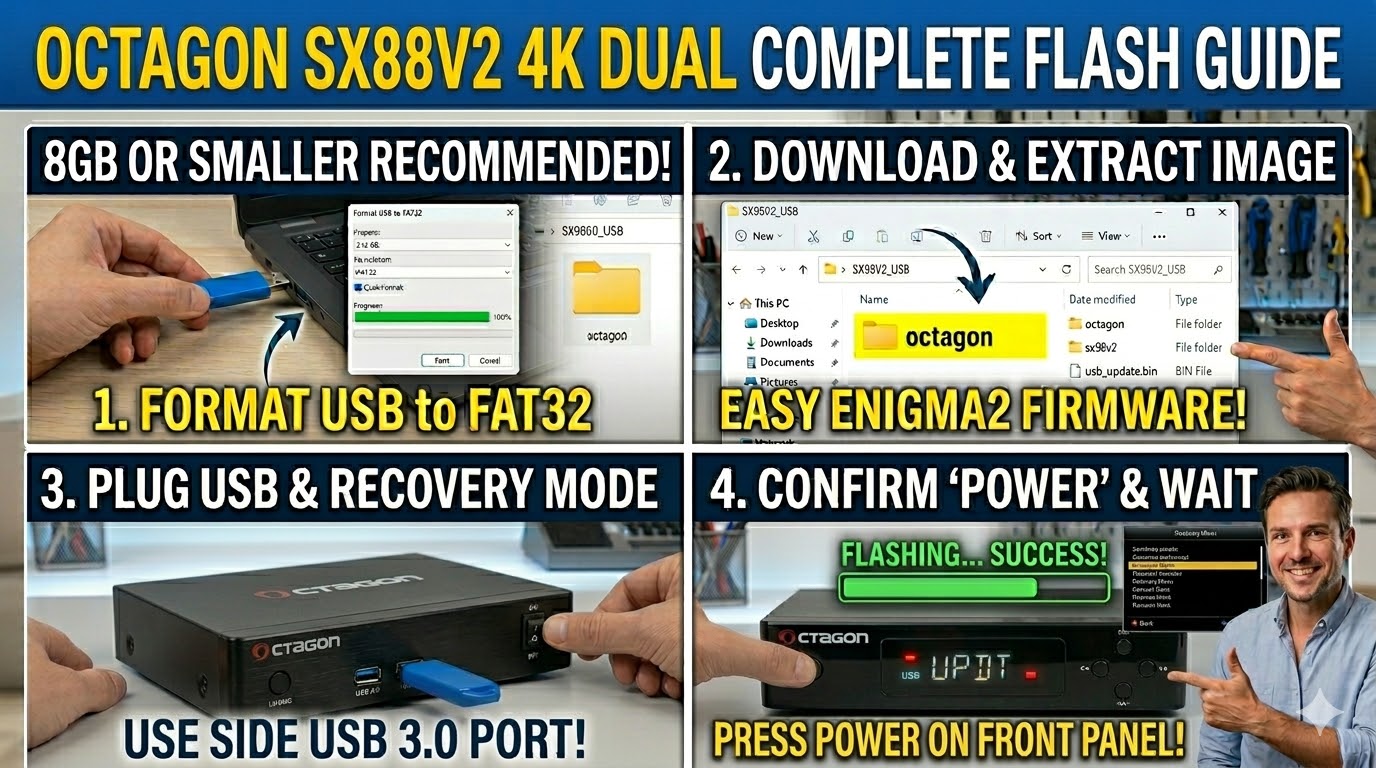
USB Stick: Use a high-quality 8GB or smaller USB drive.
-
Format: Must be FAT32.
-
Firmware: Download the image specifically for the SX888V2.
-
Use the
_mmc.zipfor multiboot slot updates. -
Use the
_recovery.emmc.zipif the box is bricked or needs a full wipe.
-
2. Folder Structure
The bootloader looks for the octagon directory.
-
Extract the downloaded zip.
-
Copy the
octagonfolder to the root of the USB stick.-
Path:
USB:\octagon\sx888v2\ -
Contents: Inside, you should see
usb_update.bin,boot.img, etc.
-
3. The Flashing Process (Recovery Menu)
-
Power Off: Turn off the power switch at the back.
-
Insert USB: Use the side USB 3.0 port (the blue one).
-
Enter Recovery: * Press and hold the Power button on the front panel.
-
While holding it, flip the back power switch to ON.
-
Keep holding the front button until the Recovery Menu appears on your TV screen.
-
-
Select Flash: Use the remote to navigate to “Flash Recovery Image” (for the emmc/recovery file) or “USB Multiboot Image Upgrade” (for the mmc/multiboot file).
-
Confirm: Select the image and press OK. The box will update, show progress, and reboot into the new image.
Pro-Tip for enigma2.net
The “888” series is often the IPTV-focused variant of the “88” series, but they share the same recovery architecture. If you are documenting this for your site, the primary distinction is the subfolder name: sx88v2 vs sx888v2.