[HOW TO FLASH] how to flash starsat lx
The StarSat LX is an Enigma2-based receiver that belongs to the “Spark” family of dual-boot devices. Flashing it requires a specific folder structure to trigger the bootloader during the startup sequence.
Preparation
-
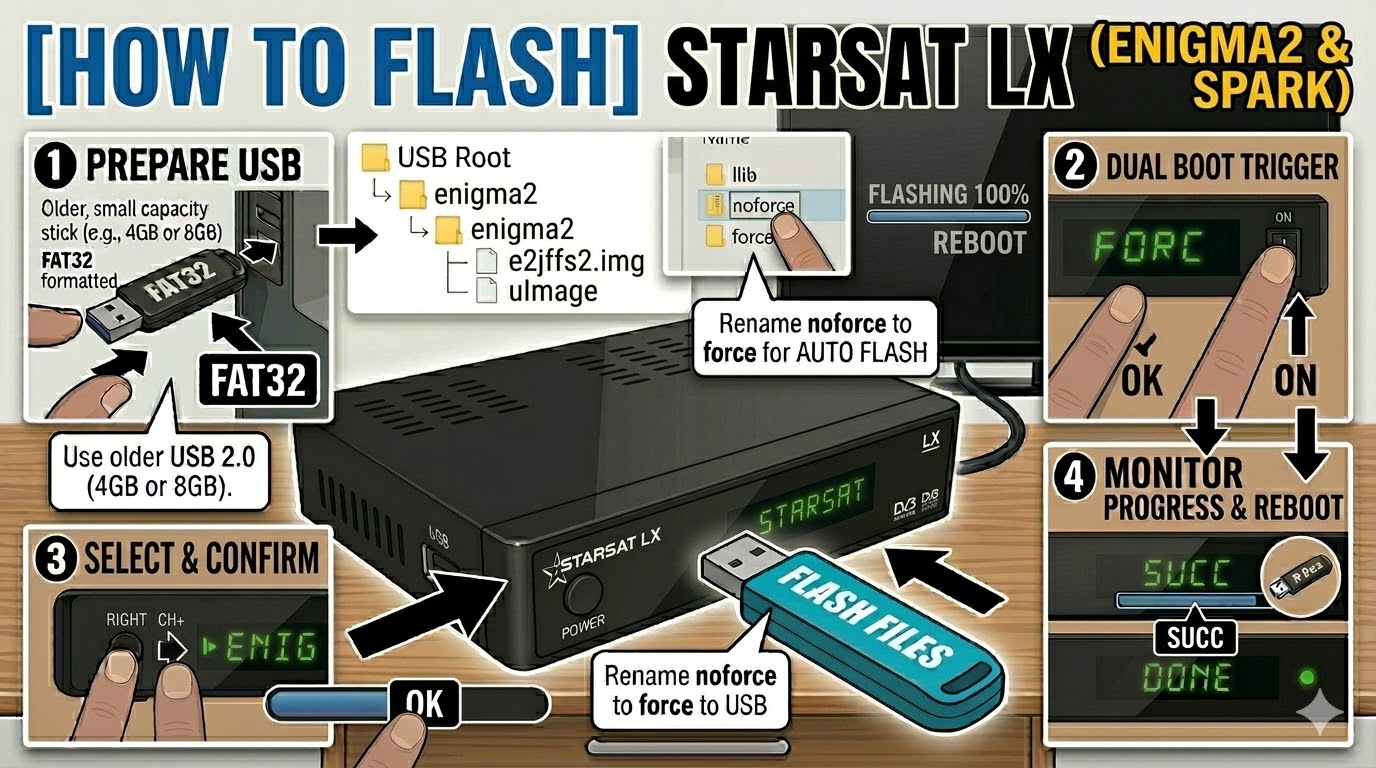
USB Drive: Use a FAT32 formatted USB stick. It is highly recommended to use an older USB 2.0 (8GB or less) drive. These receivers often fail to recognize larger or newer USB 3.0/3.1 sticks.
-
The Files: Extract your chosen image (e.g., OpenATV). You must see a folder named
enigma2. -
Root Path: Copy the
enigma2folder directly to the root of the USB drive.-
Structure:
USB Root > enigma2 > (files: e2jffs2.img and uImage)
-
Flashing Steps
-
Power Down: Turn off the receiver using the physical rocker switch at the back.
-
Insert USB: Plug the USB stick into the rear USB port.
-
The Trigger:
-
Press and hold the OK button on the front panel of the receiver.
-
While holding OK, flip the rear power switch to ON.
-
-
Select Mode:
-
Keep holding OK until the front panel display shows “FORC”.
-
Release the OK button.
-
Press the Right Arrow button (or CH+) on the front panel until the display shows “ENIG” (this selects the Enigma2 partition).
-
Press OK to confirm.
-
-
Flashing Process: The display will show “U LD” (Upload) or progress numbers. This typically takes 3 to 5 minutes. Do not turn off the power during this time.
-
Completion: Once the process is finished, the display will show “SUCC” (Success), and the box will reboot automatically into your new image.
-
Finalize: You can remove the USB stick once the boot logo appears on your TV.
Quick Troubleshooting
-
Stuck on “TTO” or “NULL”: This usually means the USB drive is not compatible or the files are not in the correct folder. Try a different (older) USB stick and ensure the folder is named exactly
enigma2. -
Dual Boot: If you want to boot back into the original Spark firmware, repeat the “Trigger” steps but select “SPAR” instead of “ENIG” when the display shows “FORC”.

The flashing process should take approximately two to four minutes to complete, while the receiver
is being flashed it is vitally important that you DO NOT power the receiver down for any reason as
this can cause serious and or permanent damage.