[HOW TO FLASH] how to flash EVO NOVA Combo
The EVO Nova Combo (also known as the Optibox EVO Nova Combo) is a versatile receiver that includes both Satellite (DVB-S2) and Terrestrial/Cable (DVB-T2/C) tuners. Flashing it requires the specific “novacombo” folder structure to be recognized by the bootloader.
Flashing the EVO Nova Combo (Step-by-Step)
1. Prepare the USB Drive
-
Format: Use a USB 2.0 stick (max 8GB is ideal) and format it to FAT32.
-
Download: Get the Enigma2 image (e.g., OpenATV) for the
evonovacombo. -
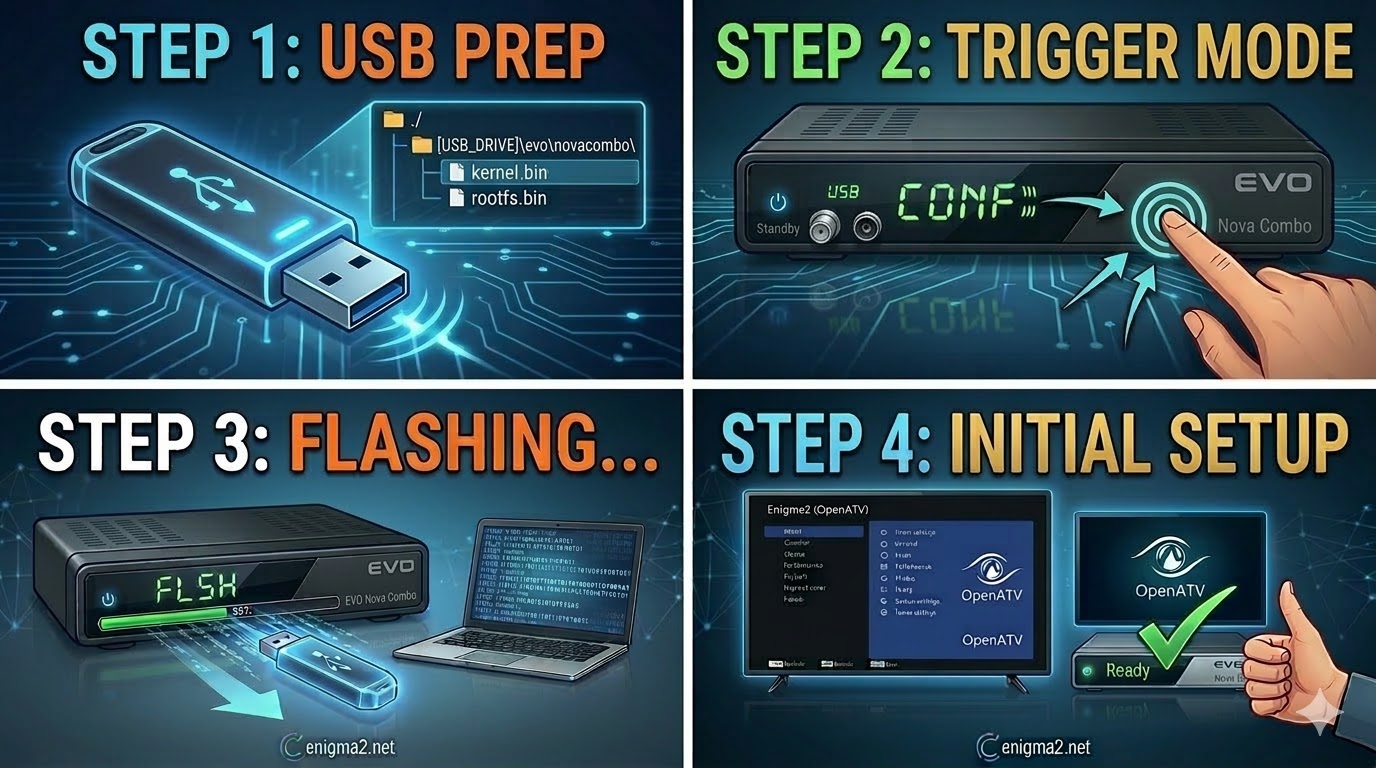
The Path: Extract the ZIP file. The root of your USB must look like this:
-
USB_ROOT/evo/novacombo/
-
-
Files: Ensure the
novacombofolder containskernel.bin,rootfs.bin, andimageversion.
2. The Flashing Procedure
-
Power Off: Turn off the receiver using the switch at the back.
-
Insert USB: Plug the stick into the rear USB port.
-
Boot Trigger:
-
Turn the power switch back to ON.
-
Watch the front panel display. When it shows “USB” or “CONF”, immediately press the POWER button on the front panel of the receiver.
-
-
Flashing: The display will show “FLSH” or a progress bar. Wait 3–5 minutes.
-
Finish: The receiver will reboot automatically. Remove the USB once the setup wizard appears.

The flashing process should take approximately two to four minutes to complete, while the receiver
is being flashed it is vitally important that you DO NOT power the receiver down for any reason as
this can cause serious and or permanent damage.