[HOW TO FLASH] how to flash TechnoMate tm twin
The Technomate TM-TWIN (OE) is the original high-definition twin-tuner model. Unlike the newer 4K versions, this legacy Broadcom-based receiver is extremely specific about its folder naming and USB hardware compatibility.
Preparation
-
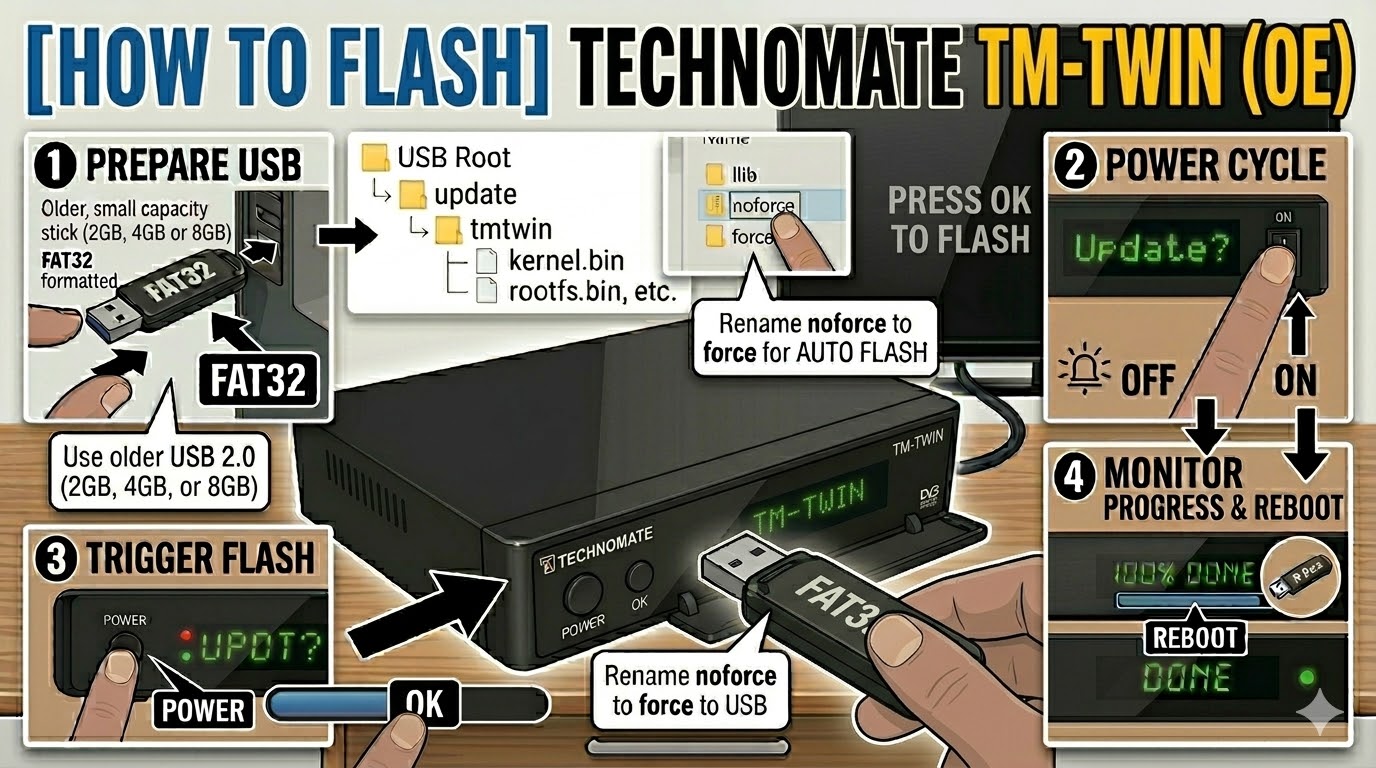
USB Drive: Use a FAT32 formatted USB stick. This model is legendary for being picky—use an older USB 2.0 (2GB, 4GB, or 8GB) drive. Modern high-speed or large-capacity drives will almost always be ignored by the bootloader.
-
The Files: Extract your image zip file (e.g., OpenATV, OpenViX). You must see a folder named
updateand a subfolder structure within it. -
Correct Path: Copy the
updatefolder to the root of your USB drive.-
Structure:
USB Root > update > tmtwin > cfe > (files: oe_kernel.bin, oe_rootfs.bin, etc.) -
Note: Ensure the folder is named exactly
tmtwin(all lowercase).
-
Flashing Steps
-
Power Down: Turn off the receiver using the physical rocker switch at the back.
-
Insert USB: Plug the USB stick into the front USB port (behind the front flap).
-
Power On: Flip the rear power switch to ON.
-
The Trigger:
-
Watch the front panel VFD display.
-
When it shows “Found Update” or “Update? Press OK”, immediately press the OK Button on the front panel (behind the flap).
-
-
Flashing Process: The display will show “Flashing” or show percentage progress. This typically takes 3 to 6 minutes. Do not turn off the power during this time.
-
Completion: Once finished, the display will show “Done” or “Success”, and the box will reboot automatically.
-
Finalize: Remove the USB stick as soon as the box starts to reboot to prevent it from detecting the flash files again on the next boot cycle.
Quick Troubleshooting
-
Box ignores the USB: Double-check the path. If it still boots to the old image, try using the rear USB port. If that fails, the USB stick is likely too modern; try an older, slower drive.
-
The “Force” Shortcut: If the front buttons are unresponsive, go into the
cfefolder on your USB, find the file namednoforce, and rename it toforce. The receiver will then flash automatically upon power-up without needing a button press.