[HOW TO FLASH] how to flash tiviar Alpha plus
The Tiviar Alpha Plus is a high-end Triple Tuner Enigma2 receiver. Like its smaller sibling, it is quite particular about the USB drive used and the folder naming convention.
Preparation
-
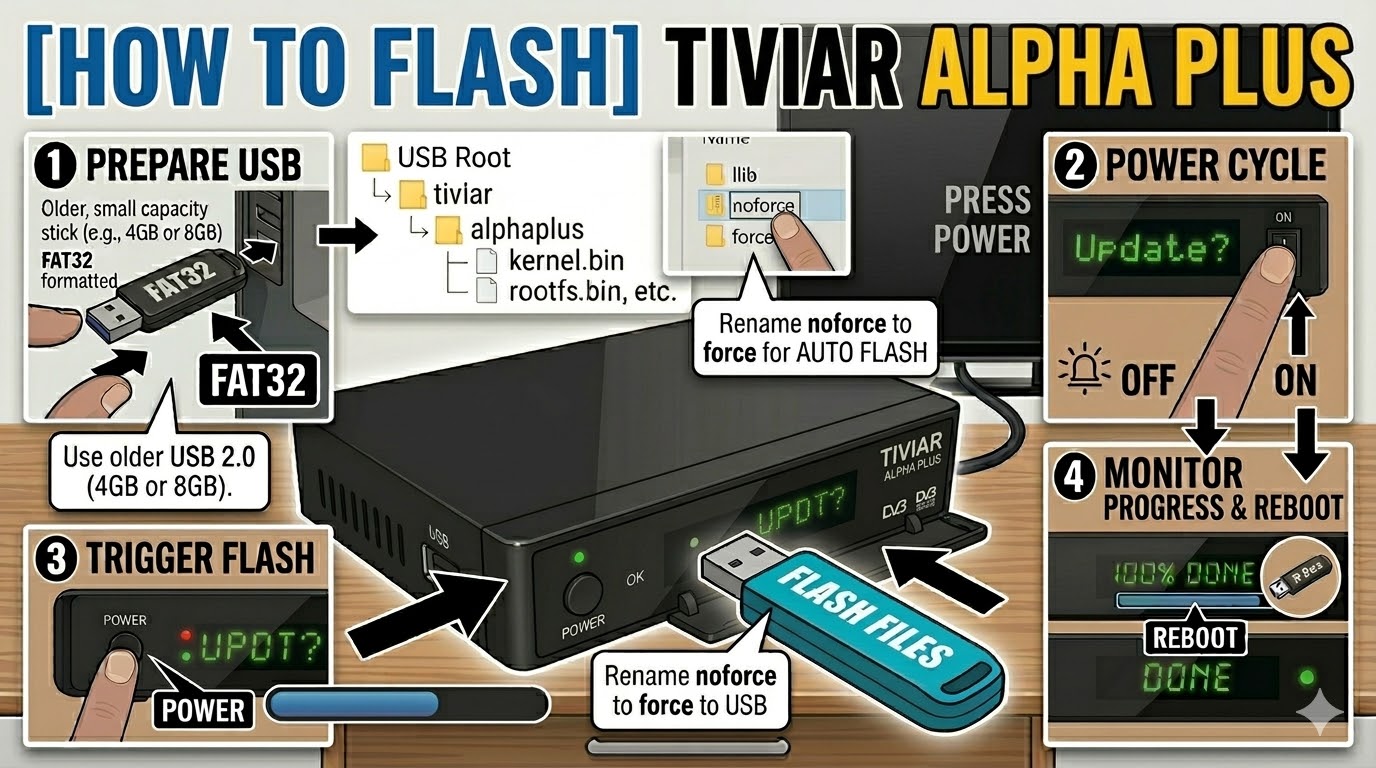
USB Drive: Use a FAT32 formatted USB stick. It is strongly recommended to use a USB 2.0 (8GB or less) drive. Modern high-capacity or USB 3.0/3.1 sticks often fail to be detected during the boot sequence.
-
The Files: Extract your image zip file (e.g., OpenATV, OpenViX, or Egami). You must have a folder named
tiviarand a subfolder inside it namedalphaplus. -
Root Path: Copy the
tiviarfolder to the root of your USB drive.-
Structure:
USB Root > tiviar > alphaplus > (files: kernel.bin, rootfs.bin, etc.)
-
Flashing Steps
-
Power Down: Turn off the receiver using the physical power switch at the back.
-
Insert USB: Plug the USB stick into the front USB port (located behind the front flap).
-
Power On: Flip the rear power switch to ON.
-
The Trigger:
-
Watch the front panel VFD display.
-
When it shows “Found Update” or “Update? Press Power”, immediately press the Power Button on the front panel of the receiver.
-
-
Flashing Process: The display will show “Flashing” or a progress bar. This typically takes 3 to 5 minutes. Do not turn off the power or touch the box during this phase.
-
Completion: Once the process is finished, the display will show “Success” or “Completed”, and the box will reboot automatically.
-
Finalize: Remove the USB stick as soon as the box starts to reboot to prevent it from detecting the flash files again on the next boot.
Quick Troubleshooting
-
Box ignores the USB: Double-check that the subfolder is named exactly
alphaplus(all one word). If it still boots into the old software, try using the rear USB port. -
The “Force” Shortcut: If you have trouble with the button timing, open the
alphaplusfolder on your PC, find the file namednoforce, and rename it toforce. The receiver will then flash automatically upon power-up without requiring a button press.