[HOW TO FLASH] how to flash Technomate TM-Nano SE
The Technomate TM-Nano SE is the original, single-tuner version of the Nano series. It is a compact Broadcom-based receiver and, like most of its era, it requires a very specific USB setup to trigger the internal bootloader.
Preparation
-
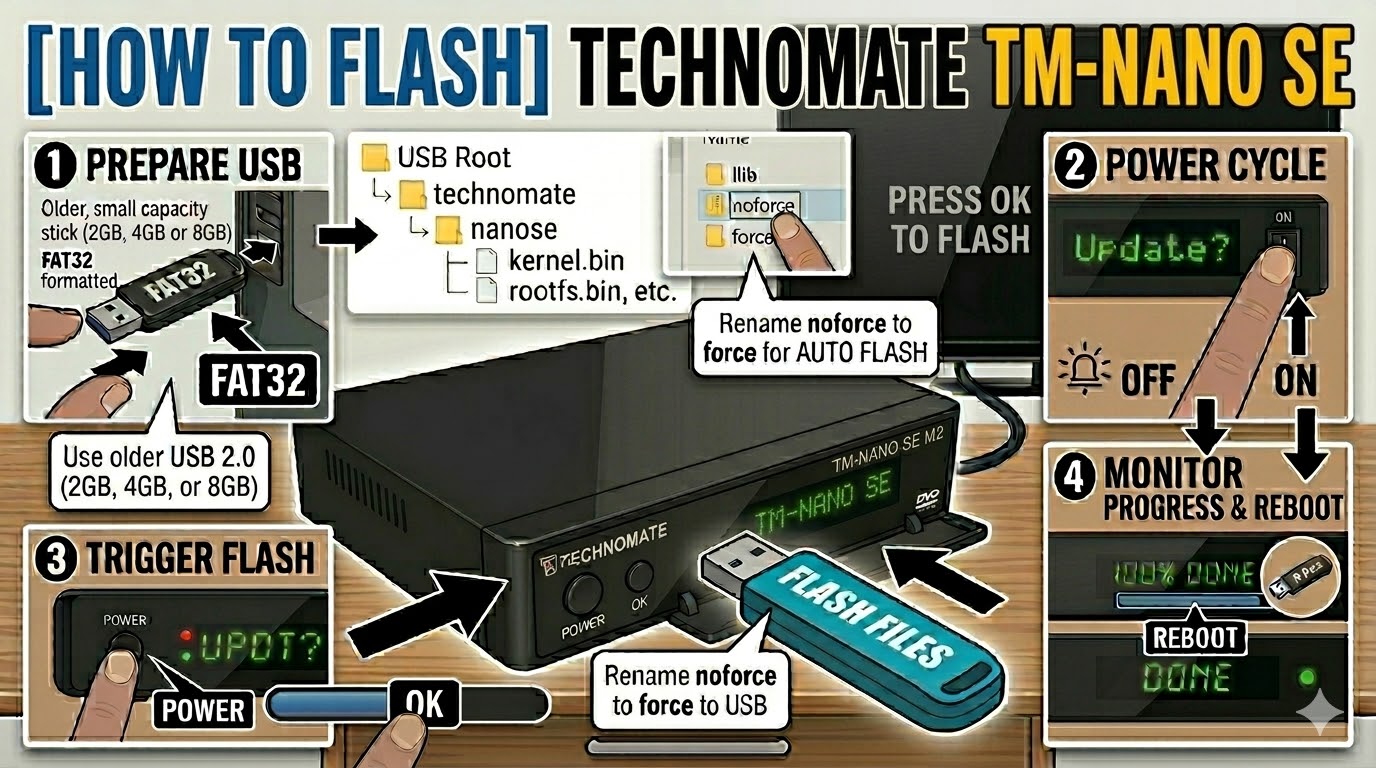
USB Drive: Use a FAT32 formatted USB stick. This model is notoriously picky with modern hardware—an older USB 2.0 (2GB, 4GB, or 8GB) drive is your best bet. Avoid USB 3.0 sticks as they often fail to initialize during the boot sequence.
-
The Files: Extract your image zip file (e.g., OpenATV, OpenViX). You must see a folder named
technomateand a subfolder inside it namednanose. -
Root Path: Copy the
technomatefolder to the root of your USB drive.-
Structure:
USB Root > technomate > nanose > (files: kernel.bin, rootfs.bin, etc.)
-
Flashing Steps
-
Power Down: Turn off the receiver using the physical power switch at the back.
-
Insert USB: Plug the USB stick into the rear USB port.
-
Power On: Flip the rear power switch to ON.
-
The Trigger:
-
Watch the front panel LED.
-
When the LED color changes or starts flashing (indicating a valid image is detected), immediately press the Standby (Power) Button on the front panel of the receiver.
-
-
Flashing Process: The LED will pulse or flash slowly while the update is in progress. This typically takes 3 to 5 minutes. Do not turn off the power during this time.
-
Completion: Once finished, the receiver will reboot automatically.
-
Finalize: Remove the USB stick as soon as the boot logo appears on your TV to prevent the box from entering the update cycle again on the next restart.
Quick Troubleshooting
-
Box ignores the USB: Double-check that the subfolder is named exactly
nanose(all one word). If the folder is namednanosem2ornanosem2plusfrom a different model’s image, it will not work. -
LED doesn’t change: If the box boots straight to your old software, your USB stick is likely not being recognized by the bootloader. Try a different, older USB 2.0 drive.
-
The “Force” Shortcut: If the front button is difficult to time, go into the
nanosefolder on your PC, find the file namednoforce, and rename it toforce. The receiver will then flash automatically upon power-up without needing a button press.