[HOW TO FLASH] how to flash ANADOL IP8 4K
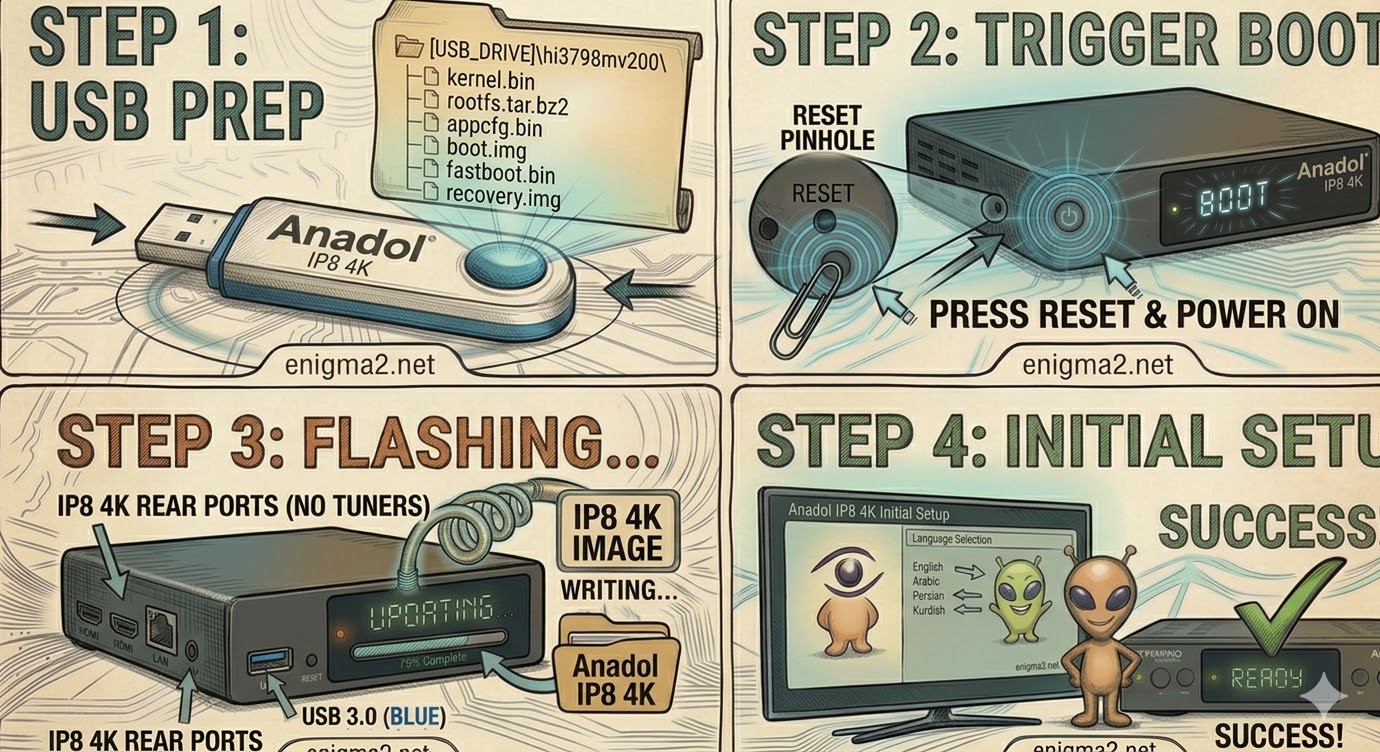
The Anadol IP8 4K is a dedicated OTT/IPTV box based on the HiSilicon chipset. Unlike the Multibox satellite receivers, the IP8 4K is designed for streaming, but it still runs on Enigma2 (Define OS or OpenATV) and uses a “Reset-Trigger” method to flash the firmware.
Step 1: USB Preparation
-
Format: Use a USB 2.0 or 3.0 stick formatted to FAT32.
-
Folder Structure: Unzip your chosen image. You must have a folder named
hi3798mv200(the chipset name) in the root of the USB. -
Files: Inside that folder, ensure you have:
-
appcfg.bin -
boot.img -
fastboot.bin -
kernel.bin -
recovery.img -
rootfs.tar.bz2
-
Step 2: The Flashing Procedure
-
Power Off: Unplug the power cable from the back of the Anadol IP8 4K.
-
Insert USB: Plug your USB stick into the side USB port.
-
The Reset Trigger:
-
Locate the Reset button (usually a small pinhole on the side or back).
-
Using a paperclip, press and hold the Reset button.
-
While holding it, plug the power cable back in.
-
-
Wait for Progress: Keep holding the Reset button until you see “UPDT” on the front LED or the flashing progress screen on your TV. Release the button once it starts.
-
Reboot: The box will automatically reboot when finished. Remove the USB drive during the reboot to avoid a loop.

The flashing process should take approximately two to four minutes to complete, while the receiver
is being flashed it is vitally important that you DO NOT power the receiver down for any reason as
this can cause serious and or permanent damage.