
[NEWS] New SoftCSA Support with OpenATV
SoftCSA for Enigma2 – Test Started!
What is SoftCSA?
Put simply, it’s a replacement for Streamrelay for channels that used ICAM
SoftCSA adds native software descrambling to Enigma2 for channels encrypted with Algorithm 3 (CSA-ALT). These channels cannot be descrambled by the receiver’s hardware descrambler and previously had to be handled via the StreamRelay workaround in OSCam.
SoftCSA integrates descrambling directly into Enigma2: the encrypted transport stream is received, descrambled in software, and seamlessly passed on to the decoders. Result: faster zapping, better performance, and full feature support.
What does SoftCSA bring?
Benefits compared to StreamRelay
- Channel switching: StreamRelay = Delayed (HTTP overhead) | SoftCSA = Fast (direct)
- Timeshift: StreamRelay = Limited | SoftCSA = Fully working
- Recordings: StreamRelay = Complicated | SoftCSA = Like normal channels
- Multi-tuner: StreamRelay = Consumes capacity | SoftCSA = No extra overhead
- Audio track selection: StreamRelay = Problematic | SoftCSA = Works normally
- EPG/Subtitles: StreamRelay = Partly faulty | SoftCSA = Complete
- FCC: StreamRelay = Not possible | SoftCSA = Supported
Technical highlights
- Transparent integration: For the user, a SoftCSA channel behaves like any other channel
- Automatic detection: OSCam reports the algorithm; Enigma2 enables SoftCSA when needed
- Hardware decoder: The box’s AV decoder is still used – only descrambling is done in software
- Cross-platform: Tested on Broadcom, HiSilicon, and AMLogic chipsets
- System information: SoftCSA status is shown in Enigma2 system information
- Skin integration: Optionally show a “SoftCSA” indicator in the infobar
FAQ – Frequently Asked Questions
What exactly is it?
SoftCSA is a software descrambling implementation directly inside Enigma2. For CSA-ALT encrypted channels (Algorithm 3), Enigma2 performs the descrambling itself instead of using OSCam StreamRelay as a detour.
Why does this make sense?
- No StreamRelay overhead: no more double HTTP connection
- Direct descrambling of the AV stream within the Enigma2 process
- Better performance for zapping and timeshift
- Fewer interruptions and more stable playback
- Full recording functionality – recordings are playable on a PC as well
- FCC support – Fast Channel Change works
What do I need?
- Compatible box – Your box must be listed here:
- OpenATV 7.6 image ( newer than 01 February 2026)
- OSCam 11907 or newer built WITH_EXTENDED_CW (The secret feed has this): For OpenATV, issue the following commands one at a time
To install oscam. For ATV users, 1. install secret feed
wget -qO- --no-check-certificate "http://updates.mynonpublic.com/oea/feed" | bashFor ATV users, 2. Perform an “opkg update”
opkg updateFor ATV users, 3. Install oscam master
opkg install oscam-masterlibdvbcsa library (installed automatically with oscam-master):
opkg install libdvbcsa1Which settings are required?
1. Disable StreamRelay for affected channels
- Mark the channel in the channel list → “Play channel without StreamRelay”
- Or: rename/delete the file /etc/enigma2/whitelist_streamrelay
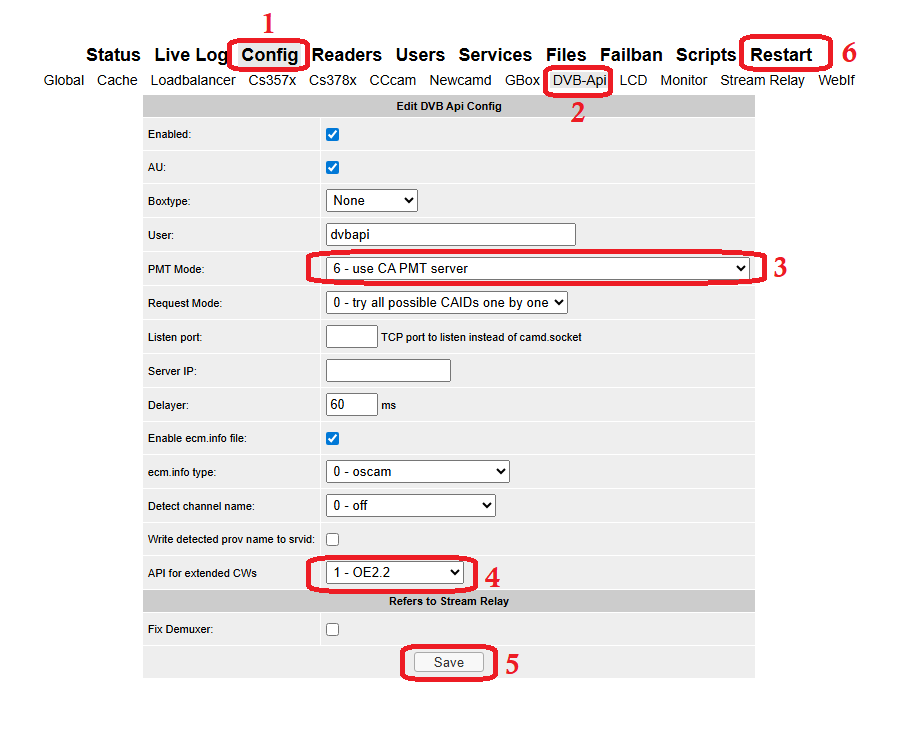
2. Adjust the OSCam configuration
In the [dvbapi] section of oscam.conf:
pmt_mode = 6
extended_cw_api = 1
Alternatively via the OSCam WebIF under Config → DVBApi.
3. Verification
If the following entry appears in the OSCam log, everything is set up correctly:
2025/12/17 21:09:34 c (dvbapi) Client connected: 'Enigma2' (protocol version = 3)protocol version = 3 indicates that Enigma2 is connected with Extended CW support.
How do I know if SoftCSA is active/available?
- System information: Menu → Information → System Information shows whether SoftCSA is enabled in the image
- OSCam log: Software descrambling is logged for SoftCSA channels
- Skin infobar: If the skin you are using has been adapted, the infobar will optionally show a “SoftCSA” indicator (see skin tweak below). If you skin has not, please inform the skin maintainer. Details to add to the skin are below.
Skin integration: SoftCSA indicator
If you want to show an icon in the infobar when SoftCSA is active, you can use this skin code:
<widget alphatest="blend" pixmap="icons/ico_softcsa.png" position="1800,1004" render="Pixmap" size="56,35" source="session.CurrentService" zPosition="3">
<convert type="ServiceInfo">IsSoftCSA</convert>
<convert type="ConditionalShowHide"/>
</widget>
The icon must exist in the skin directory as icons/ico_softcsa.png. Position and size can be adjusted to your skin.
Do recordings and timeshift work?
Yes! This was one of the main development goals:
- Recordings are stored correctly descrambled
- Timeshift works like with normal channels
- Recordings are playable in VLC and other players on a PC
- FCC (Fast Channel Change) is supported as well
Which boxes are supported?
The implementation has been tested on these chipsets:
- Broadcom BCM7252S, BCM7278, BCM73625 (VU+, Mut@nt, etc.)
- HiSilicon Hi3798MV200 (Octagon, AB-COM Pulse, etc.)
- AMLogic (DreamOne, DreamTwo)
The complete list of supported boxes can be found via the BuildStatus link above.
Known limitations / notes
- SoftCSA (CSA-ALT) only: other encryption types are handled as usual
- OSCam required: keys are still provided by OSCam – only descrambling runs in Enigma2
- Preview status: this is a test build – feedback is explicitly welcome!
Issues? Feedback?
Please test extensively and report:
- Which box / which chipset
- Which channel / which bouquet position
- What exactly does not work
- Debug logs are welcome (with Enigma2 debug enabled)
Enjoy testing!
Other images:
The code has been added to some other images and is available from:
- Open Blackhole (Version 5.6 003 and newer)
- Open PLI (Scarthgap branch – 05 February 2026 and newer)
- Open ViX (6.8 004 – when its released)Set featured image
- Egami 11.0-R14 and newer